You’ve been coding for hours, yet logic still doesn’t click. Your frustration grows. But here’s the truth that changes everything: this isn’t because you lack talent. You’re probably learning the computer programming wrong way. The secret isn’t coding harder, it’s coding smarter. Once you shift your approach, everything transforms.
At TutorBoost, we’ve guided countless students through exactly this struggle, and they discovered that changing your strategy matters infinitely more than spending more hours. Let’s fix your programming approach together.
Why Does Programming Feel So Impossible to Understand?
Programming is harder than most subjects because you juggle abstract concepts simultaneously. Unlike math with formulas or history with timelines, programming demands pattern recognition, logic, and creative problem-solving at once. Your brain is working correctly, it just needs the right framework.
Here’s the brain science: you visualize abstract systems while debugging concrete errors, translating logic into syntax while understanding data structures.
Every concept connects to every other, creating a web where missing one foundational piece collapses everything. Why programming feels impossible isn’t weakness, it’s your brain recognizing genuine complexity.
You can understand variables perfectly, then blank when using them in functions. That’s not failure, your brain asking for connections. This is exactly why struggling with computer science feels different. You need systems thinking, not memorization.
What Are the 3 Biggest Myths About Learning Programming?
Three false beliefs are sabotaging your progress.
Myth #1: “I need to memorize every line of code.” Professional programmers DON’T memorize. They understand logic and reference documentation constantly. Memorization is wrong because programming is problem-solving, not trivia. Understanding WHAT code does matters more than memorizing exact syntax.
Myth #2: “Some people have natural talent for programming.” False. Programming is a learned skill, not innate talent. The “naturally gifted” programmer simply had better foundational knowledge and practice. Every expert struggled like you as a beginner.
Myth #3: “I need to code 8 hours daily.” Wrong. Four focused hours beats eight unfocused hours. Your brain’s focus drops after two hours. Marathon sessions create exhaustion, not learning. Consistency and quality beat quantity.
How Do You Actually Learn Programming Smarter, Not Harder?
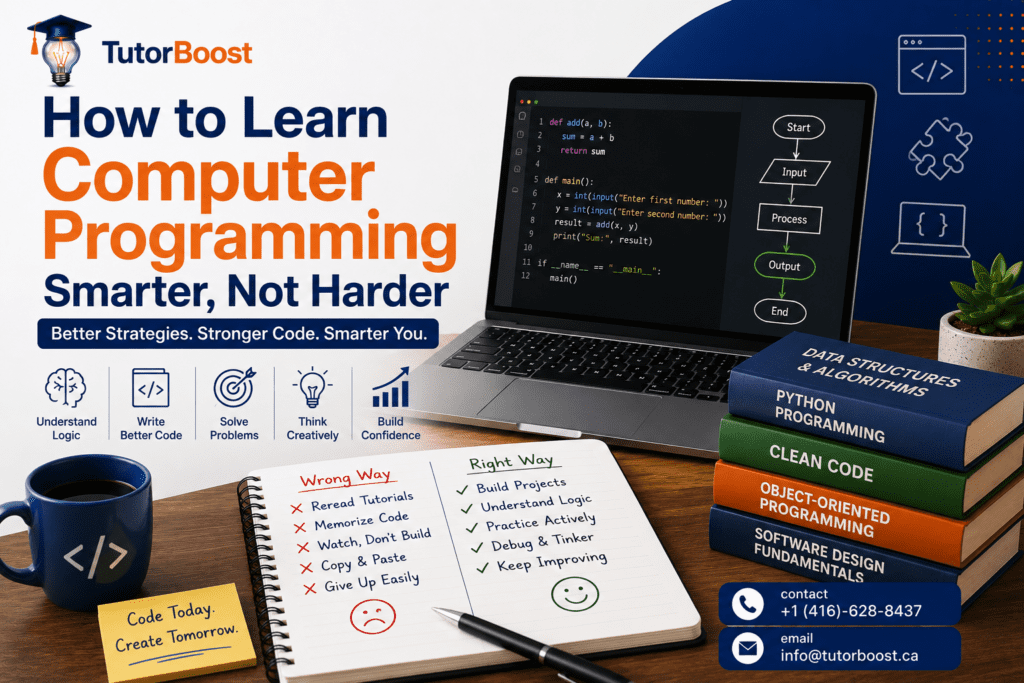
Learning programming smarter means shifting from passive learning (watching tutorials) to active engagement (building, experimenting, debugging). Here are five strategies that work.
Stop Reading Tutorials, Start Building Projects
Your brain learns through doing. Pick a small project calculator, to-do list, or simple game. Make mistakes. Fix them. Projects force problem-solving; tutorials feel easy but don’t stick. Real understanding comes from hands-on building where you solve actual problems.
Understand Logic Before Memorizing Syntax
Logic transfers across languages; syntax changes constantly. Draw flowcharts, explain code logic out loud, understand WHY code works. This shifts focus from memorization to comprehension. Understanding patterns makes everything else click.
Code by Hand (Yes, On Paper)
Hand-writing forces precision and strengthens your brain-to-code connection. Write pseudocode or code on paper without running it. This builds interview readiness while cementing concepts. Hand-coding teaches more than typing ever will.
Tinker With Code
Take working code and break it intentionally. Change variables. Delete functions. See what explodes. This “what if?” mindset builds confidence and understanding faster. Experimentation reveals how systems work better than passive reading.
Debug Actively, Don’t Google Immediately
Debugging teaches more than successful code. When stuck, debug FIRST trace code, print variables, understand error messages. Google SECOND. Error messages aren’t failures; they’re learning gold.
How Do You Start Coding Smarter This Week?
Knowing strategies is one thing. Starting is another. Here’s exactly what to do in the next seven days.
Days 1-2: Pick ONE Simple Project & Write It. Choose a tiny project rock/paper/scissors, temperature converter, or basic calculator. Write pseudocode on paper first. Code it. It doesn’t need perfection. You’ve built something that works. That’s your first win.
Days 3-4: Deliberately Break Your Code & Fix It. Take your working project. Change a function. Delete a line. Figure out what went wrong WITHOUT Googling immediately. Fix it yourself. You’re a debugger now. This is how confidence builds.
Days 5-6: Explain Your Code Out Loud. Take your project and explain it to an imaginary person. If you can’t explain it, you don’t understand it yet. Go back and understand the confusing parts. Real understanding isn’t “it works”, it’s “I KNOW why it works.”
Day 7: Celebrate & Plan Next Project. Review what you learned this week. Notice: you understand programming differently now. Pick your next small project. This becomes your template for learning forever.
When Does It Actually Get Easier? The 4-Phase Programming Timeline
Here’s the honest timeline so you know when to expect progress.
Phase 1: The Confusion Phase (Weeks 1-2)
Code doesn’t make sense. Syntax feels alien. Your brain builds new pathways, not memorization shortcuts. Concepts are clear individually but don’t connect yet. This is COMPLETELY NORMAL.
Phase 2: The Clarity Phase (Weeks 3-4)
Concepts start connecting. Error messages make sense. You explain code without documentation. This is the breakthrough moment. At TutorBoost, we see this as when momentum builds.
Phase 3: The Building Phase (Weeks 5-8)
You build independently. You solve problems without help. Grades now reflect actual understanding. You help others, reinforcing your learning.
Phase 4: The Mastery Phase (Weeks 8+)
Programming feels like creative problem-solving. Knowledge sticks permanently because you understand, not memorized.
Why Does Everyone Hit a Programming Confidence Wall? And How to Push Through It
Even with the right strategies, most learners hit a moment where they feel stuck. This is completely normal.
You hit week three and think “I’ve been coding for three weeks but still can’t build anything from scratch.” Everyone feels this. Every programmer has felt exactly this way. It’s not about you.
Understanding takes patience because your brain is literally rewiring. Progress isn’t linear. You might feel stuck one week, breakthrough the next. You’re comparing yourself to advanced programmers, not to where YOU started. That “naturally gifted” coder spent months feeling exactly like you.
Track what you CAN do now: build projects, debug independently, explain concepts. These are REAL signs of progress even if you feel stuck. Give yourself 2-3 more weeks of consistent effort. If frustration stays high after 4-6 weeks AND grades aren’t improving, talk to your teacher. Sometimes programming tutoring help accelerates everything you need. Professional support isn’t failure, it’s smart strategy.
When Should You Consider Getting Professional Help?
Smart learning strategies work for most students, but sometimes expert support accelerates progress dramatically. Here’s how to know when it’s time.
Red Flag #1: You’re following these strategies for 3+ weeks, understand concepts in study sessions, but blank on tests or assignments. A tutor identifies exactly which concepts aren’t clicking and explains in ways that work for YOUR brain.
Red Flag #2: Project building feels overwhelming. You don’t know where to start. Programming tutoring breaks complex projects into manageable steps and teaches problem-solving frameworks. Suddenly projects feel doable.
Red Flag #3: You feel isolated, frustrated, or behind your peers. One-on-one support rebuilds confidence fast and provides personalized accountability. Contact us or make an appointment today. Let’s create a personalized plan for your programming success.
Final Thoughts
Programming isn’t about memorizing. It’s about understanding logic and building things. The strategies in this article work thousands of students have proven it.
Start with just one strategy this week and feel the difference immediately. If you need support, TutorBoost is here to help you master programming without the stress. Visit our home page to learn more about how we guide students through this exact journey. You’ve got this.
Frequently Asked Questions
What’s the difference between learning programming smarter vs harder?
Smarter means quality-focused, project-based, understanding-driven study (4 hours/week); harder means quantity-focused, tutorial-heavy, memorization-focused (12+ hours with less retention).
How long until I can build my own project?
Most students build basic projects by week 4-6 using these strategies; it depends on your starting point and time investment.
Should I learn multiple programming languages at once?
No. Master fundamentals in ONE language first; jumping between languages slows progress and creates confusion.
What if I keep getting syntax errors and feel stupid?
Errors are completely normal, every programmer gets them constantly; they’re learning opportunities, not failures or indicators of your ability.
Can these strategies work if I don’t have natural talent?
Absolutely, programming is a learned skill, not a talent; these strategies work precisely because talent doesn’t matter, only consistent practice and the right approach.